


Meteogram Weather Widget
4.2101.00 Reviews
App Specs
- Version
- 5.6.0
- Updated On
- License
- Free
- Downloads
- 100,000+
- Developer
- Meteograms Ltd
- Categories
- Weather
- Platform
- Android
Screenshots


 Analysis by AppCompare
I often check the weather several times before leaving home, only to realize I still don’t know when rain is likely to start or whether the wind will make a walk unpleasant. Meteogram Weather Widget tackles that small but recurring annoyance by putting forecast details into a visual timeline. Instead of hopping between screens to piece together the day, I can scan a graph and get a better sense of how conditions may change.
That approach is the main reason I’d consider it over a basic forecast app. Meteogram Weather is a free weather app from Meteograms Ltd, and its focus is less on a single headline temperature and more on showing several forecast details together. It has a 4.2 average from around 1.5K ratings, but whether its style suits you depends on how much information you actually want to see.
When a forecast needs more than an icon
A standard weather screen is convenient when I only need to know whether it will be sunny. It can be less useful when I’m trying to time a commute, plan a walk, or decide whether to bring a light jacket later in the day. A graph can make those changes easier to spot: temperature, precipitation, and wind information appear as parts of a changing picture rather than isolated facts.
That visual emphasis is useful, but it also sets a clear expectation. This is not the simplest choice for someone who wants one large number and a quick glance. If a chart feels like extra work, a conventional forecast app may be a better fit. I find Meteogram Weather most worthwhile when I have a decision to make and want to compare conditions across the day.
First Impressions and Setup
Setting up the Meteogram Weather Widget is a breeze. Once you’ve downloaded it, the app immediately gets down to business. No lengthy sign-up process here, just pure weather goodness. The interface is sleek and user-friendly, which is a huge win in my book. I mean, who has the time to navigate through complicated menus, right?
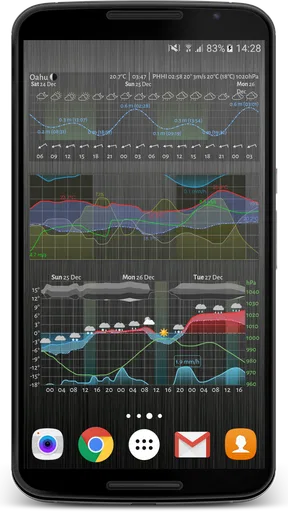
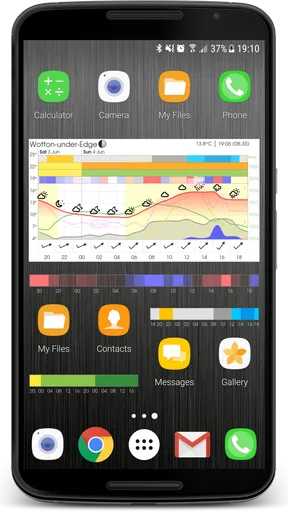
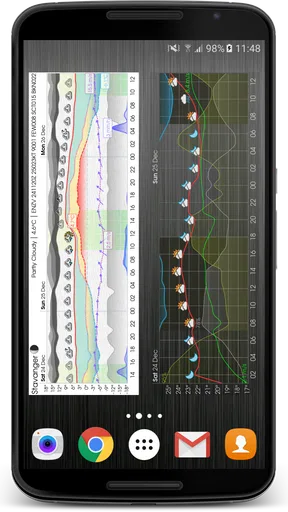
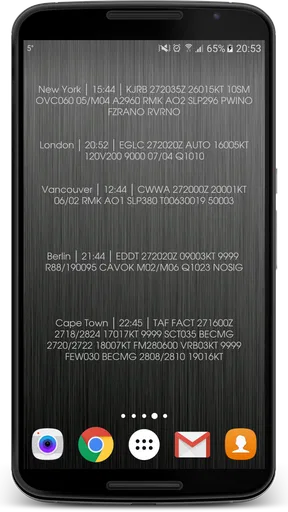
The app offers a variety of widget styles, so you can pick one that suits your home screen aesthetic. I opted for the transparent widget because, let’s be honest, it looks super cool. You can customize everything from the color scheme to the type of data displayed. It’s like the app knows I want all the deets without any of the clutter.
Setting up a useful home-screen view
The first useful choice is not simply picking the prettiest widget; it’s deciding what you need to learn from it. If I’m mainly checking whether a morning trip looks wet or windy, a compact display with only the most relevant details is easier to scan than a crowded chart. If I’m planning outdoor time, showing more forecast information can be worth the extra visual density.
Worth Reading Before You Choose

EA SPORTS FC Mobile 26 Is a Bigger Football Game, but It Takes Time

Flipboard Shows What News Apps Must Do Beyond the Feed

Switching to Android Auto Means Rethinking Your Driving Routine

Google Calendar Makes a Crowded Week Easier to Manage

Ludo King Makes the Most of the Minutes Between Plans

Baby Panda World Brings Quick Play to Modern Phones, but Its Game Library Feels Busy
I’d also treat widget customization as a practical tool rather than a one-time decoration project. Start with a layout you can read quickly, then adjust the colors or displayed details if the graph blends into your wallpaper or feels too busy. A transparent style can look tidy, but contrast matters more than appearance when you’re glancing at it in a hurry.
For someone who relies on a home-screen widget, the key question is whether it answers the same routine question every day without needing to open the app. If it does, the widget can remove a small repeated step. If you want to explore several details or compare locations, opening the app is likely to be more comfortable than trying to fit everything into a small space.
Features That Stand Out
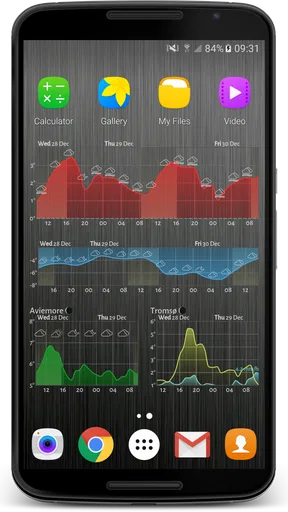
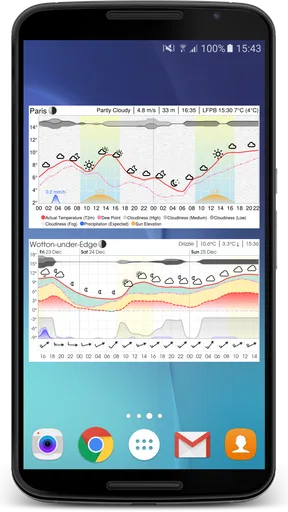
One of the standout features of this app is its detailed weather graph, or as I like to call it, the "weather at a glance". This graph displays everything from temperature changes and precipitation to wind speed and direction. It’s incredibly detailed and updates in real-time, ensuring you’re always in the loop.
Another feature that caught my eye is the option to view weather information for multiple locations. Perfect for those of us who love to travel or have family in different parts of the world. The app allows you to easily switch between locations with a simple swipe.
And let’s not forget the weather alerts. The app sends timely notifications about significant weather changes, which is super handy for planning your day. Whether it's a sudden downpour or an unexpected heatwave, this app has got your back.
Making the forecast useful in everyday life
Consider a morning when I have a commute, an errand to run at lunch, and a walk planned after work. A single “rain today” label doesn’t tell me whether I need an umbrella now, should move the errand, or can wait until the evening. Looking at the curve and precipitation together gives me a more practical way to judge the timing, while the wind details can change whether a short outdoor trip feels comfortable.
The same habit helps when I’m packing for a short trip. I can switch to the destination and look at the forecast as a sequence rather than relying on the current conditions at home. That does not remove the need to check again closer to departure, but it can help me notice whether the day looks variable enough to pack layers instead of one outfit for a single temperature.
Tide charts make the app relevant to a narrower but useful group: people planning time near the coast. A forecast alone may tell me about rain and wind, while tide information addresses a different part of the outing. I’d still check local guidance for activities where safety depends on conditions, but having weather and tide views in one app can reduce the need to jump between separate tools during casual planning.
Performance and Usability
In terms of performance, the app is smooth and responsive. I didn’t encounter any glitches or lag, which is a major plus. The data loads quickly, and the app doesn’t drain your battery like some other weather apps out there. It’s clear the developers put a lot of thought into optimizing the app for everyday use.
Usability is top-notch. The information is presented in a way that’s easy to digest, even if you’re not a weather expert. The icons and graphs are intuitive, and I found myself getting all the information I needed at a glance.
What the charts can—and cannot—settle
A detailed display is helpful for comparing the shape of a forecast, but it should not be mistaken for certainty. Weather can change, and a smooth-looking graph may make estimates appear more precise than they are. I use it to plan flexibly—such as choosing a likely dry window for a walk—not as a promise that conditions will stay exactly as shown.
Alerts are useful as a prompt to look again, not as a substitute for checking the forecast before a weather-sensitive plan. For a routine commute, a notification may be enough to remind me to take a coat. For a long drive, a hike, or an event that would be difficult to change, I’d make a fresh check and use appropriate local advice rather than relying on one alert or chart.
There is also a trade-off between seeing more and understanding more. Adding many lines and labels can make a widget feel comprehensive but slow down the glance it was meant to provide. I’d keep the home-screen view focused, then use the fuller display when I have time to interpret it. That separation makes the customization feel purposeful instead of turning the widget into a miniature dashboard I rarely read.
How it differs from ordinary weather apps
Many mainstream weather apps are built around a current-condition card, a daily high and low, and a short written summary. That layout is often faster for a quick answer and may be preferable if you rarely plan around the timing of rain or wind. Meteogram Weather’s advantage is the visual relationship between forecast details: it helps me notice how conditions may shift rather than treating each hour as an unrelated entry.
Compared with checking several specialist services, the combination of a graphical forecast and tide charts can be convenient for casual coastal planning. But a dedicated tide resource may be a better choice when tide timing is the central concern, just as a simple weather app can be better for someone who dislikes charts. I see this app as a focused alternative, not a reason everyone needs to replace their usual forecast.
It is free to start, while optional in-app purchases range from about 49 cents to around $35 per item. I would first decide whether the basic chart and widget workflow fits my habits before considering any purchase. The app is rated for Everyone, and its current version is 5.6.0; it has been available since December 2014 and has passed 100,000 installs. Those details suggest a long-running utility with an established audience, though they don’t tell me whether its particular presentation will suit my own routine.
Who benefits most, and who may prefer another option
I’d recommend trying it if you regularly plan around changes during the day, want a configurable forecast widget, compare weather in more than one place, or occasionally need tide information alongside the weather. It is especially suited to people who enjoy reading visual summaries and are willing to spend a little time choosing which details belong on their home screen.
I would steer a less chart-oriented friend toward a simpler app if all they want is the current temperature and a quick rain check. I’d also avoid treating a general-purpose weather widget as a specialist tool for a high-stakes outdoor decision. The best choice depends on the cost of being wrong: a glanceable graph is convenient for everyday plans, while demanding conditions call for more deliberate checks.
Why You Should Give It a Try
So, why should you download the Meteogram Weather Widget? Well, if you love having access to detailed weather information without any fuss, this app is a must-have. It combines functionality with style and gives you control over how you view your weather data.
Whether you’re planning a weekend getaway, a morning run, or just deciding what to wear for the day, this app provides all the insights you need. Plus, it’s just fun to use. Who knew checking the weather could be this engaging?
In conclusion, the Meteogram Weather Widget is more than just a weather app—it’s a comprehensive weather solution that keeps you informed and prepared for whatever Mother Nature throws your way. So go ahead, give it a whirl, and see how it transforms your weather-checking routine. You might just wonder how you ever lived without it!
Pros
- Highly accurate weather forecasts.
- Customizable widget sizes.
- Detailed hourly data available.
- Minimalist and clean design.
- Supports multiple locations.
Cons
- Limited free features.
- Occasional data refresh delays.
- No radar maps included.
- Ads in the free version.
- Complex for casual users.
FAQs for Meteogram Weather Widget
What features does the Meteogram Weather Widget offer?
The Meteogram Weather Widget provides detailed weather forecasts displayed in a unique graphical format, allowing users to see temperature trends, precipitation, wind speeds, and more at a glance. It combines data from multiple sources to ensure accuracy and even offers customizable settings to tailor the widget's appearance and information to your needs.
Is the Meteogram Weather Widget user-friendly for beginners?
Yes, the Meteogram Weather Widget is designed with a user-friendly interface, making it accessible for beginners. It includes a straightforward setup process and intuitive navigation. Users can easily customize their widget and access detailed weather information without needing extensive technical knowledge.
Does the Meteogram Weather Widget consume a lot of battery or data?
The developers have optimized the Meteogram Weather Widget to minimize battery and data usage. It updates at regular intervals that you can adjust in the settings, ensuring minimal impact on your device's resources. However, frequent updates or animations may increase consumption, so adjust settings accordingly.
Can I customize the appearance of the Meteogram Weather Widget?
Absolutely! The Meteogram Weather Widget offers a variety of customization options. Users can change the widget’s size, colors, and the type of information displayed. This flexibility allows you to align the widget’s appearance with your device’s theme and your personal preferences, enhancing your overall experience.
Is there a cost associated with downloading or using the Meteogram Weather Widget?
The Meteogram Weather Widget is available for free, but it may offer in-app purchases or a premium version. These options typically provide additional features, such as advanced customization, ad removal, or enhanced data sources. Check the app store for specific pricing details and to decide if the premium options meet your needs.


